
Launch a CPU LLM Server on AWS with Ollama + Open WebUI
Running a private LLM stack on AWS usually means installing model runtime, setting up a UI, configuring services, opening ports, and fixing startup issues before you can even test a prompt. This AMI is designed to remove that setup burden. Prezelfy CPU LLM Server AMI provides a deployment-ready stack with Ollama and Open WebUI, tuned for CPU-based workloads and packaged for fast launch in AWS.
What Do We Offer with Our CPU LLM Server AMI?
This AMI includes more than a standard install. It is preconfigured for faster onboarding, operational consistency, and secure-by-default behavior.
Included in this AMI:
- Ollama installed and configured as a system service
- Open WebUI installed and configured as a system service
- CPU-friendly model preload workflow
- Amazon Linux 2023 based hardened baseline
- Firewall configuration for required ports
- Open WebUI access on port 8080
- Ollama API access on port 11434
- Service startup integration and runtime validation
Architectural Design
The architecture is intentionally simple and practical for teams that want a private LLM endpoint without GPU dependency.
- ollama.service runs local model serving on
127.0.0.1:11434 - open-webui.service provides browser UI on
0.0.0.0:8080 - Open WebUI communicates with Ollama over local network
- Model storage is set to a fixed path for consistency
- First-boot fallback can preload missing models if needed
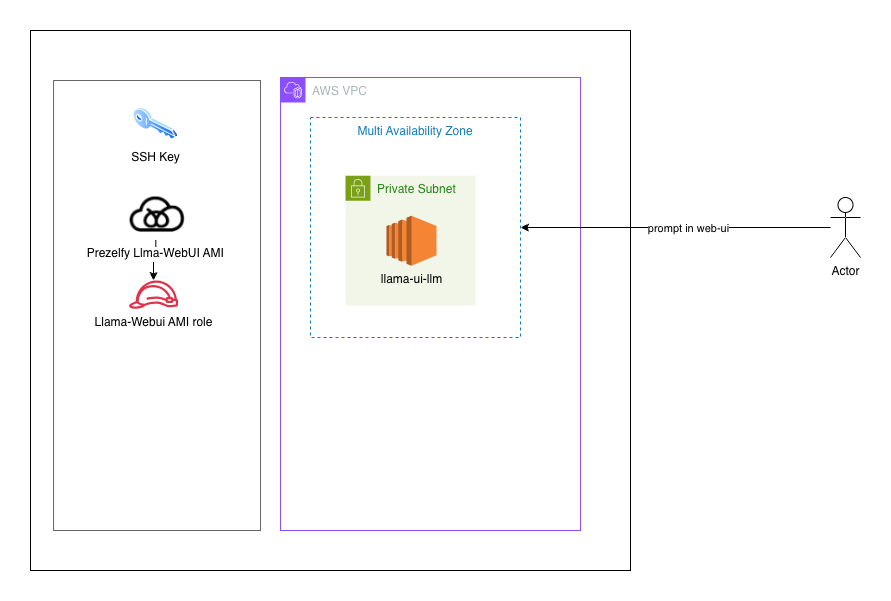
This design targets reliability and predictable behavior across instance restarts and new launches.
How to Use the CPU LLM Server
- Launch an EC2 instance from the AMI in a subnet with outbound internet access.
- Configure security group inbound rules:
TCP 22 for SSH(restricted to your IP)TCP 8080 for Open WebUITCP 11434 for APIaccess (optional, restrict as needed)
- Open Open WebUI in browser:
http://<public-ip>:8080
- Verify services on host:
sudo systemctl status ollamasudo systemctl status open-webui
- Verify models:
ollama list
Example API call:
Access API via HTTPcurl http://127.0.0.1:11434/api/generate -d {"model":"phi3","prompt":"Hello"}'
Troubleshooting
Cannot access Open WebUI from public IP:
- Confirm open-webui is running
- Confirm host firewall allows 8080/tcp
- Confirm security group allows 8080/tcp
- Confirm subnet route/NACL allows traffic
No models visible in UI:
- Check ollama list
- Pull model manually if needed:
ollama pull phi3 - Refresh Open WebUI model view after model pull
Ollama service fails to start:
- Validate binary path: command -v ollama
- Check logs:
sudo journalctl -u ollama -n 200 --no-pager
Open WebUI local curl fails:
- Check listener:
sudo ss -ltnp | grep 8080 - Check logs:
sudo journalctl -u open-webui -n 200 --no-pager
Ready to Launch?
If you need a practical, private, CPU-based LLM stack on AWS, this AMI gives you a faster path from instance launch to first prompt. It is built to reduce setup friction while keeping deployment flexible for your own network and access policies.